

2026 Spring Feature Roundup
Since 2026 began, we’ve introduced several practical improvements across both our Booking and Management Apps.
From identifying duplicate bookings before they cause attendance issues to providing clubs with additional safeguarding information and improving the booking journey for parents, these updates focus on helping staff access the information they need more quickly while reducing common administrative frustrations.
Enhanced Safeguarding Information
What’s New?
Social Worker & Local Authority Support Information
Following the deployment of our enhanced SEND functionality, as shown in our previous post, we’ve expanded the information providers can collect and manage, helping to support and strengthen safeguarding standards.
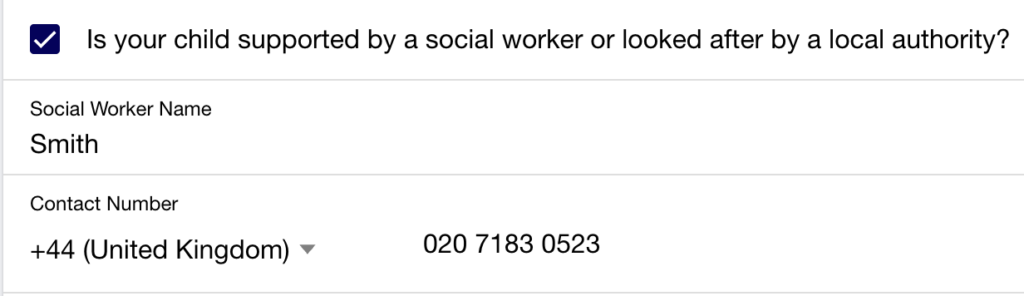
Parents can now indicate whether a child has been supported by a social worker or has been looked after by a local authority. This information helps clubs build a more complete understanding of the children attending their settings and can provide valuable context when planning support.
- A New Social Worker / Local Authority Checkbox has been added to the Booking App, allowing parents to record a Social Worker Name and Contact Number where applicable.
- A New Register icon on the Management App highlights children with recorded social services information.
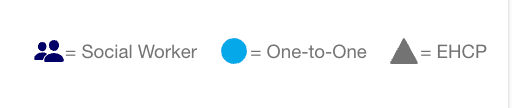
- Further information is also available within the Management App through Registers > Signatures > Contact Information.

Also: How this looks on your printed documents
Signatures sheet (printed at the front desk for parents to sign children in and out): SEND flags, Social Worker indicators, and other sensitive information are not displayed here. This is intentional – the Signatures sheet is visible to all, so only the information needed for sign-in is shown, in line with GDPR best practice.

Registers (printed and handed to the staff member running the activity): These are for staff use only, so they include the full picture – who should be attending, relevant flags, and supporting context – so staff can easily check who they should have in their group.

Quick Tip: Print All Registers in One Go
Did you know you can print every register at once? Use the Print All Registers button in the top-right of the Registers screen. This saves a huge amount of time – rather than printing each register individually, one click does the lot. If you’re not already doing this, start today!
All of the above information helps clubs build a more complete understanding of the children attending their settings and can provide valuable context when planning support.
Enforcing Unique Emergency Contact Numbers
Emergency contact information is one of the most important pieces of data held within the platform.
To help maintain accurate records, the system now prevents the same phone number from being entered multiple times across emergency contact entries.
- If a duplicate number is entered, users will receive a validation message explaining that the same phone number cannot be used more than once:

- The system also requires three unique contact numbers to be provided– as Ofsted requires–and will display a message if there are insufficient unique numbers available:

This helps ensure that emergency contact records remain accurate, meaningful and useful when staff need them most.
Other Management App Updates
Duplicate Booking Warning
Managing registers becomes much more difficult when a child is accidentally booked into overlapping sessions.
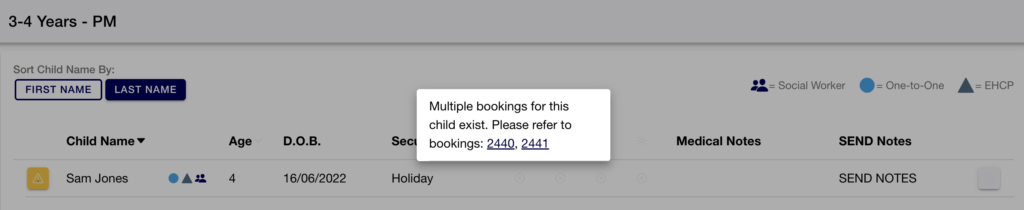
To help prevent this, the platform will now automatically identify potential duplicate bookings and display a visible warning icon wherever a conflict exists.
- Clicking the warning icon displays further information, allowing staff to quickly identify and resolve booking issues before they affect attendance records.
Latest Posts:
- WP2Shell: the WordPress vulnerability that hit sites worldwide, and how we respondedIn July 2026, a critical vulnerability in WordPress core itself was disclosed and almost immediately exploited across the internet. It’s been nicknamed WP2Shell.
- Introducing Draft & Scheduled TimetablingBuilding a timetable takes time, and until now, keeping track of what’s live, what’s still in progress, and what’s safe to change wasn’t always easy. We’ve rolled out a set of updates to the Schedules section of the Management App to make the whole process clearer and safer.
- AI Bot Traffic is here to stay5 reasons why higher traffic isn’t always good news for your WordPress site
Booking Experience Improvements
Improved Loading Feedback
We’ve introduced skeleton loaders throughout key stages of the Booking App.
Previously, while pages were loading, some users would attempt actions multiple times because it wasn’t always clear that information was still being processed. In some cases, this could result in duplicate actions, such as adding a child more than once.
- The new loading indicator displays a simple three-dot animation while the page loads, before transforming into the Add Child button once the page is ready. This provides a clear visual cue that the system is still processing and helps prevent users from attempting the same action multiple times.

How it Works: An Overview
This represents one of the first steps in a wider programme of Booking App improvements, with additional enhancements planned throughout the year.
Why These Updates Matter
Many of these enhancements have been developed in response to everyday challenges faced by clubs and providers.
These updates help organisations:
- Identify duplicate bookings before they affect registers and attendance records.
- Maintain more accurate emergency contact information.
- Access important safeguarding information more quickly.
- Reduce time spent checking and correcting records.
- Provide staff with greater context when supporting children and families.
- Give parents clearer feedback throughout the booking journey.
We’ve also continued to invest in the Booking App experience, introducing clearer loading feedback and laying the foundations for further improvements planned throughout 2026.
Interested in Learning More?
Whether you’re looking to simplify bookings, improve safeguarding processes or manage multiple locations more effectively, we’d love to show you how our platform can help.